Office of the Registrar Newsletter

Fall 2026 First Half End of Term
The Fall 2026 First Half term is drawing to a close. The last day for Fall classes for the First Half term was Wednesday, September 30th, followed by Reading Day on October 1st. Final Exams will be held on October 2nd & 5th. Additionally, the process for error checking registration (for students who did not successfully complete their First Half-term courses and are registered for the Second Half-term) will commence after the final grading deadline on October 9th. You may view these dates, and more, on the Fall 2026 (1st Half Term) Academic Calendar.
Email Discontinuing
Registrar Forums – Thank you
We are moving away from the Transfer-credit-group@charlotte.edu email address. OneIT has deleted this group account at our request. If you have transfer credit-related questions, please use transfercredit@charlotte.edu. All members of the Transfer Credit Team have access to this email and will respond with the same level of support.
Thank you to all who attended one of our September Forums. We are finalizing the notes from both dates and will share the presentation and notes shortly. We appreciate your partnership.
Student Program Change Enhancements, Tips & Tricks
Below are enhancements and pointers for the newly revised Undergraduate Student Program Change (SPC) process.
Process Overview
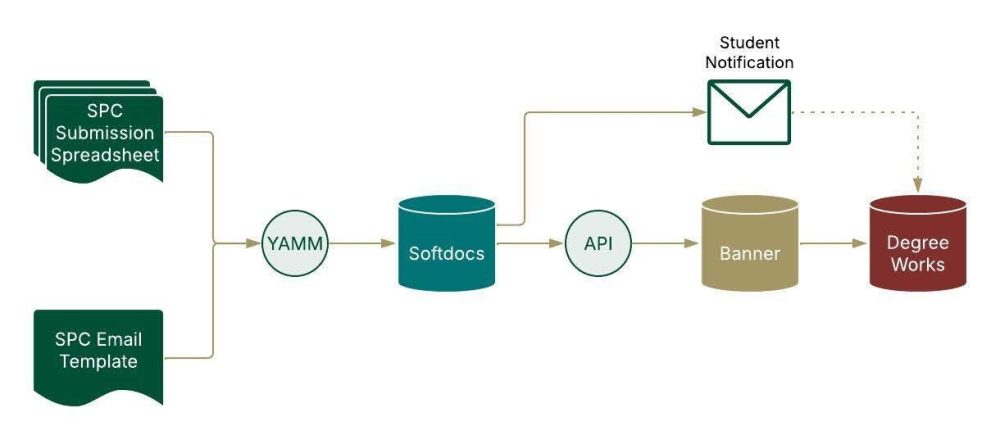
The new SPC process leverages a number of technologies to introduce automation and data validation, while simultaneously migrating the SPC workflow from Perceptive Content to Softdocs, Charlotte’s new document management system.
On behalf of the requesting student, authorized SPC submitters enter the student’s requested and approved curricular changes into their department-restricted SPC Submission Spreadsheet. The submitter then uses a YAMM mail merge to upload their requests in batch to Softdocs, creating an individual Softdocs electronic SPC request document for each row, automatically associated with the student. Staff in the Office of the Registrar review each request for completeness. Complete requests are sent via the API to Banner, automatically updating the student’s curriculum. The system then automatically generates a confirmation email to the student, encouraging them to review their changes in DegreeWorks.
Enhancements
Launching earlier this year, we continue to roll out iterative enhancements. A few are highlighted here:
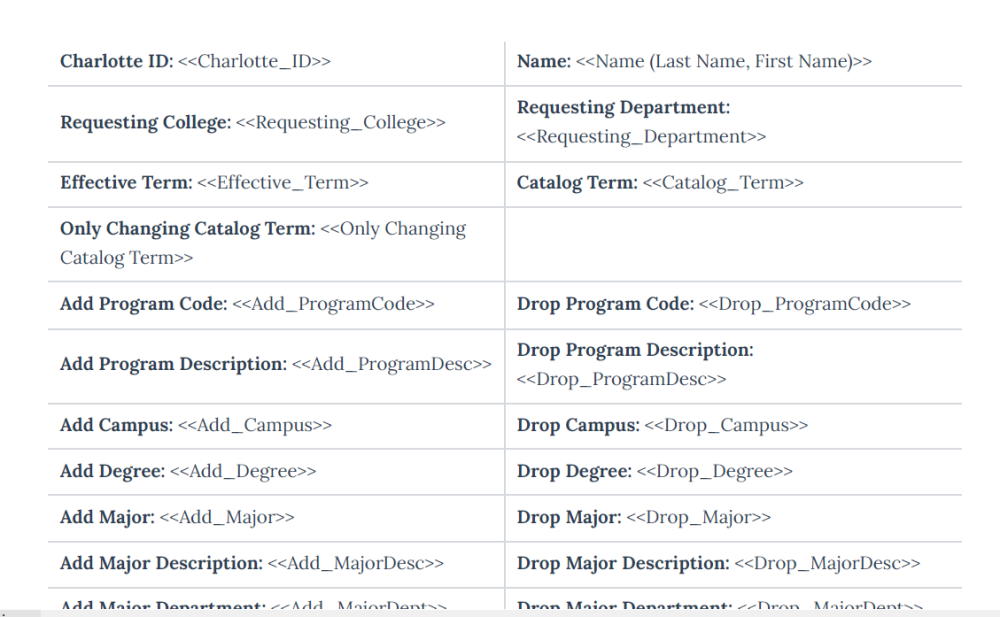
NEW SPC Email Template
A new SPC Email Template (2.0) is now live to improve request processing times and readability. Please update your saved Gmail draft as soon as possible. Note: The legacy template will be retired shortly.
Updating Your Gmail Draft
- Delete the previous SPC Email Template from your Gmail drafts.
- Open SPC Email Template 2.0 and copy all content (Ctrl + A, then Ctrl + C).
- Compose a new draft email with the subject line: “Student Program Change”
- Paste the new template content into the body of the email.
- Select this newly created draft the next time you run the YAMM process from your SPC Submission Spreadsheet.
Adding Rows
Submitters now have a way to add rows to their SPC Submission Spreadsheet without a TDX Ticket request.
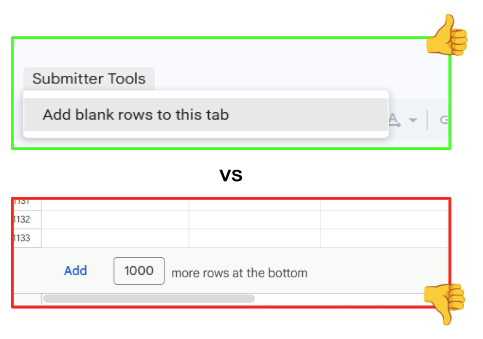
Using Google’s default “Add X more rows at the bottom” button at the end of the sheet fails to carry over essential formulas and validations, causing submission errors.
To safely add functional rows, use this custom OneIT tool instead:
Steps to Add Rows
- Open your SPC Submission Spreadsheet.
- In the top menu bar, select Submitter Tools > Add blank rows to this tab.
- Authorize the script (first-time users only): Follow the prompts to grant required permissions for this spreadsheet.
- Enter row count: Enter the number of rows needed and click OK. (We recommend adding 50 or fewer rows at a time for optimal performance.)
- Dismiss the confirmation pop-up. Your new rows are now ready to use.
Current Program Code Lookup
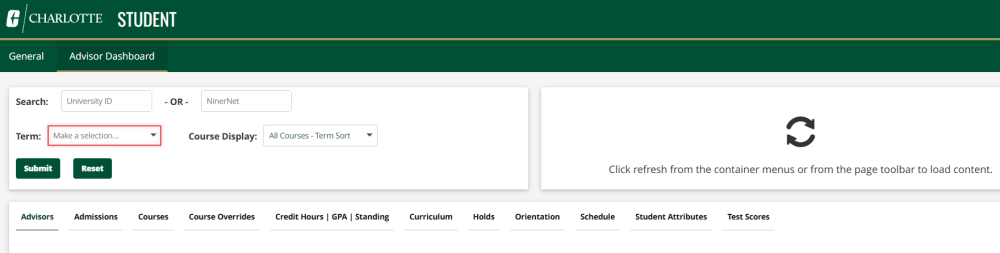
To give submitters an easy way to look up a student’s current program code, we added Current Program Code to the Advisor Dashboard. To access the Banner Advisor Dashboard:
- Go to NinerNet > Employee > Report Central > Student
- Select the Advisor Dashboard tab
- Enter the Student’s ID, or NinerNet, as well as the term you are looking up, and click Submit
- Select the Curriculum tab to display the student’s curriculum for the queried term
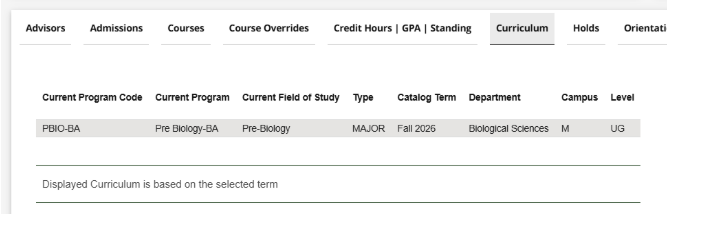
Program Code Definitions
Every program of study at Charlotte has a distinct Program Code in Banner, distinguishing it from all other programs. Program Codes are attached to students to create the student’s base curricular record. Undergraduate Program Codes consist of the following elements;
- Major Code: A four-character code assigned to the major.
- Degree Code: A two- to four-character code assigned to the degree.
- Concentration Code: Present, if applicable, a two- to four-character code assigned as the concentration
- Distance Education: The presence of ‘DE’ at the end of the Program Code designates the program as offered only via Distance Education.
Here are a few examples:
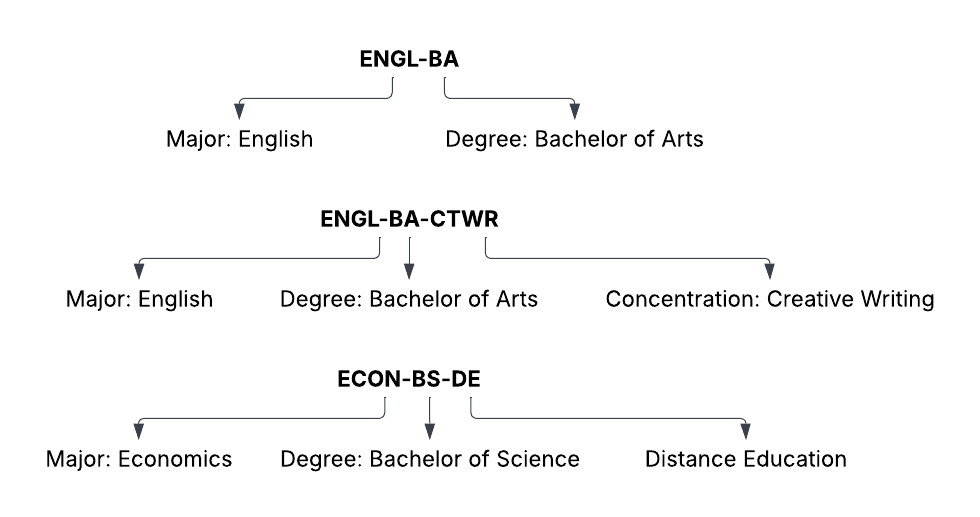
Curriculum tabs by Catalog Year have been made available within the SPC Submission Spreadsheets. These tabs contain Program Code information and can be utilized as a convenient reference guide.

Important Dates
- October 1: Reading Day for First Half Term
- October 2: Unsatisfactory Mid-Term Grades due for Fall 2026 by noon
- October 2 – October 5: Final Examinations for First Half Term
- October 5: Unsatisfactory Mid-Term Grade notices emailed to students for Fall 2026
- October 8: Last day to change Grade Type (P/NC or Audit) | Policy Information
- October 8: Last day to Change or Opt-Out of Grade Replacement | Policy Information
- October 8: Last day to withdraw from course(s); grade subject to Withdrawal Policy | Policy Information
- October 9: Final Grades due for First Half Term @ noon
- October 10: Student registration appointment times available on the web
- October 12 – October 13: Student Recess – No Classes
- October 13: Optional Reschedule Date for Possible Interruption
- October 14: First day of classes for Second Half Term
- October 15: Last day to add/drop for Second Half Term with no grade | Payment Information
- October 19: Grade Replacement auto selection process runs for Second Half Term | Policy Information
- October 26: Unsatisfactory web Mid-Term Grading access available for Second Half Term
- October 26: Registration for Spring 2027 begins | Registration Information
- October 30: Unsatisfactory Mid-Term Grades due on the web by noon for Second Half Term
- October 30: Planned Schedule Interruption: Weekday Football Game – All classes starting at or after 2:30 p.m. should make arrangements | Schedule Interruption Guideline